Thursday, February 19, 2015

Exercise 11 - Garageband loop mix

25 Points
Submit an MP3 15seconds max!

Your teacher will come around and give you 10 points for a cleaned up computer.  All files you need in the Documents folder and all files cleaned off of the Desktop/Download folder.

Your teacher will also give you 10 points for updating your "website".

You will experiment with Garageband to make your own 15 second MP3 music.


 Step 1:  Open Garageband.  Choose any of the projects but I will show you how to do "Hip Hop" choice.
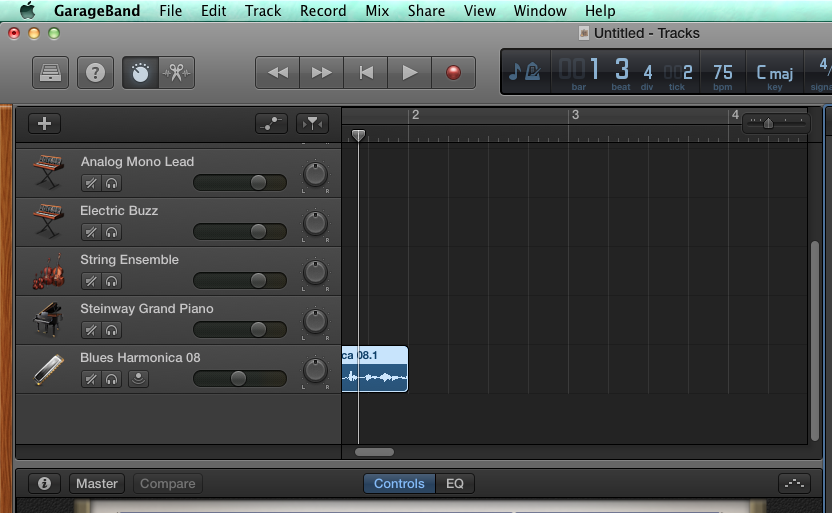
 Step 2:  Look at the loops available (highlighted) and you will drag them on to the big black area in the middle.  But you have to go to the bottom of the group of tracks listed on the left.


 Step 3:  See how I dragged a loop over but I had to scroll down on the tracks so that it would work.  Now just start layering tracks. Have fun.
Step 4:  When I am done, go to Share > Export Song to Disk     
Step 5:  Be sure you give it the name of Period#_last_first_11x, choose MP3 as the format and remember where you saved it.  Put the MP3 into the Mr. Komar Dropbox.

Wednesday, February 11, 2015

Exercise 10 - Paper Toy Design

100 Points
Due February 17


Class,
Your job is to make a PAPER TOY using Adobe Illustrator (or Photoshop) or a combination.

Use Google to find more templates and search for "paper toy fold out templates for illustrator"

Here is an example of a good one if you feel like just a box:


Try making a self portrait, or a toy for a niece or nephew, or maybe something for your valentine!

Steps:
1.  Find a template you like.  
2.  Save to your computer.
3.  Open template in Illustrator and draw away.  Use Photoshop if you want to bring in photos of other creatures.

If you want to make something using this template, here is how
1.  Go to http://design.tutsplus.com/articles/design-a-custom-vectortuts-paper-toy-round-2--vector-5069 and see examples and how to fold it up when you are done drawing.
3.  Open ZIP file and open the .AI file (the Adobe Illustrator File)

Submit your final paper cutout as a PDF and name it period#_lastname_firstname_10x

Thursday, February 5, 2015

Exercise 9 : Haida / Zuni Tracing

Exercise 9
100 Points
Due 2/11
Native Art – Vector, Geometry and Symbol

In Adobe Illustrator make 2 drawings on one page.  Choose one design from each of the following 3 groups and copy it as accurately as possible.  For Extra Credit make your own design based on an animal of your choice.

1.  Choose a Haida design to copy.  Use the pen tool to trace the outlines and close your shapes to fill with color.  OR YOU CAN GO LOOK UP HAIDA / TLINGIT DESIGNS ON THE WEB TO PICK YOUR OWN TO COPY.

2.  Choose a Zuni pot design and try to copy a piece of the pattern and repeat it across the page.

EXTRA CREDIT:  Make your own design for the 3RD drawing -- using what ever style you want.  If you want to make your own in a Haida influence, or your own rug design, or your own pottery motif -- be creative!

YOU WILL FIND THE ORIGINAL IMAGES TO TRACE IN THE SHARED FOLDER.

Haida / Tlingit Images


Zuni Pottery Designs


HERE IS AN EXAMPLE OF A STUDENT ZUNI COPY:


Further reading 

Haida and Tlingit
http://www.ccthita.org/
http://en.wikipedia.org/wiki/Haida


Zuni
http://www.ashiwi.org/


Exercise 8 - Return to Illustrator : Video Game for Pen Tool Practice

We are going to return to Adobe Illustrator.

To prepare for some of the upcoming exercises.  Let us review how to use the Pen tool in Illustrator.

First, go make a landscape (you did this before) and then go try to save Weber!


2 Parts:
Part 1 -
25 Points
Redo "Landscape" Tutorial (remember this one?)
Show the final picture to Teacher for 25 Points


Exercise 1: Land


Part 2 - 
25 Points
Due End of Class (2/3 - per. 2, 4 and 2/4 - per. 1, 5, 7)
Show the Teacher you completed for 25 Points.


Sunday, January 25, 2015

Exercise 7 - Compare 2 "objects" and present to the class

100 Points
Due Friday, 1/30

Class

  • You will present to the class a 1 minute comparison of 2 “subjects” – something that is interesting to you.  Some kind of hobby, place, dream, or event.  I will project your 2 pages for all to see.
  • Use Adobe InDesign to create a 2 page document. 
  • Each page will contain an image, text, a title and a box with color. 
  • The items must overlap in some way. 
  • You must make the images on the pages link to somewhere on the internet (in this presentation)
  • Both pages must have at least 5 pieces of information about that image.

Here are some examples of what you could choose to compare: video games, dance styles, foreign cities, music videos, architectural buildings, novels, cars, trucks, low rider bicycles, shoes, etc.

I compared 2 ways to go up and down the Grand Canyon...


Make yours even more personal and by all means play around with the layers and objects to even make more of a collage of images.

The instructions and my interactive PDF are on the Mr. Komar Shared Folder.

Thursday, January 22, 2015

Exercise 6 - Sporting Event Ticket

Due 1/27
100 Points


Background

For this lesson you assemble two master pages and two page spread. The end product in this project is a pair of sample tickets, one for basketball and one for a motocross event.  They are the same in layout and style.  Only the event information, color and background image differ.  A strategic use of master pages eliminates all duplication of effort.  


If you want 5 points extra credit – make one or both of the tickets for your own event. 


If you want 10 points extra credit - make a ticket design for Superbowl XLIX

If you want 20 points extra credit - make a ticket design for Superbowl XLIX using Adobe Illustrator and come up with your own image design

Remember!  For all assignments, do not turn in the original file.  Save as a PDF so that it can be printed.  (If you use Illustrator, Save as a JPEG so that it is one big image.)

Thursday, January 15, 2015

Exercise 5 - Project Proposal

Due 1/20

BACKGROUND

For this InDesign lesson you will assemble a 4-page. black-and-white publication. This project proposal presents an architect's plan for the development of a community facility within the coast town of Bella Coola. Located in British Columbia the western-most province of Canada, Bella Coola is named for the people who have in habited the region for uncounted generations.  To establish a base for this multipage publication, you will assemble a master page. Once assembled, this master page will make it possible to place text and graphics elements, column guides, and page-number markers (for automatic page numbering on every page within the proposal publication automatically.  In this exercise, you will begin assembling by setting up the document, including guides, margins, columns, and layers. 

You will find the instructions and files to insert in the Mr. Komar Shared folder under "05 Project Proposal"

Here is how the final publication will appear: